Evidence of past spend
A confirmed paid placement is a past transaction with a source you can check. That makes it firmer than an intent guess from a page visit, but it isn't proof of a current need for your product.
How it works
A company that paid to be listed somewhere has shown it will spend money on distribution. We find that evidence, check the business behind it, and show you its public business contact routes.
We sweep public directories, launch boards, marketplaces and listing pages for signals that a business has paid someone on the internet to grow. Paid placements, promoted slots, high-effort submissions and ad tech all count as evidence.
Public pages only. No logins, no paywalls, no scraped leak dumps.
From each company's own site we pull the product, audience, pricing, maturity and public business contact routes, then score how strong the buying signal is. Every non-derived field carries the source URL and the date we saw it.
Unknown stays blank. We never invent a price, a category or an address.
Filter by category, signal strength, contactability and maturity. Every row shows why it qualified, so you can judge fit before you spend a minute on it. Export the set you chose as CSV or a ready-made AI prompt, or connect your AI assistant and work the list from chat.
Suppressed companies are never shown or exported, on any plan.
Open the published business channel — email, contact form or social account — and make your case to a company with source-backed evidence of paying for distribution. Draft it yourself or with your AI assistant. Your outreach, your voice, your customers.
You send the messages. This product never sends email on your behalf.
BuyerCue MCP New
Connect BuyerCue to Claude Code, Codex, Claude, or any assistant that supports remote MCP with OAuth. Then ask in plain English: find companies that fit your offer, unlock the best ones within a daily limit you set, and draft a first message for each. Setup takes one copied prompt and a sign-in.
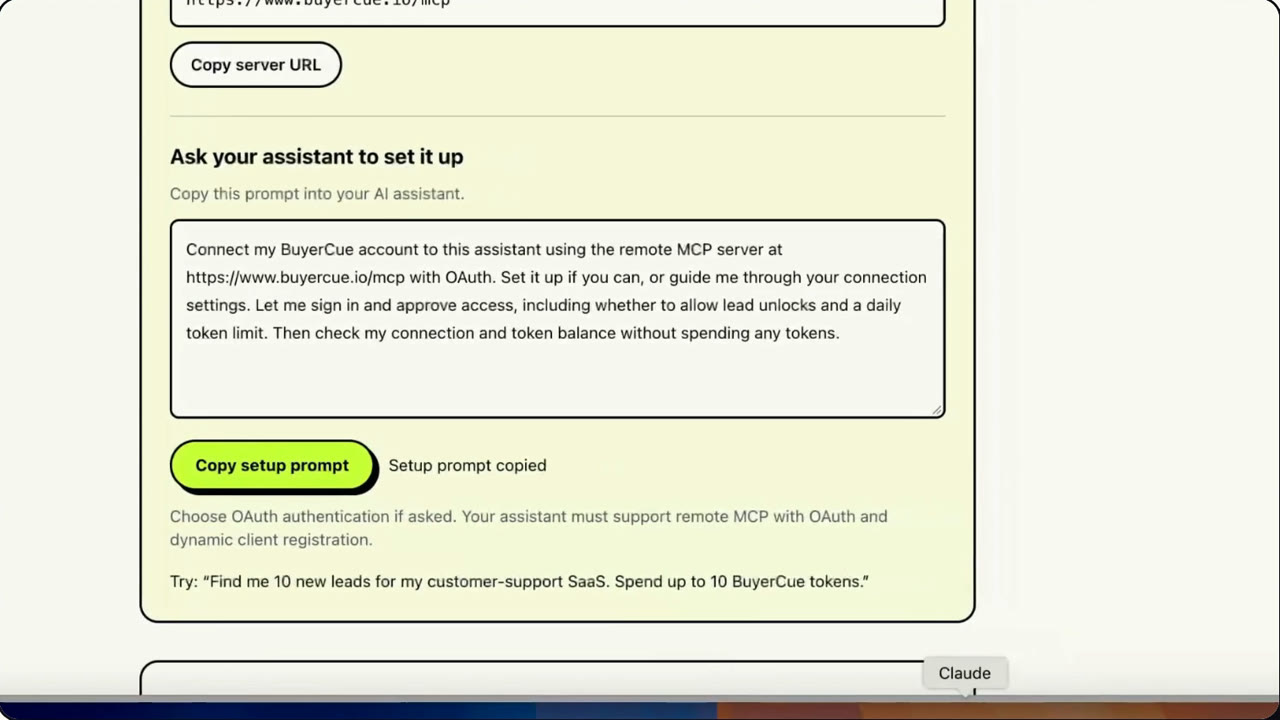
Open Connected apps in your account and copy one prompt into your assistant. It adds the BuyerCue server for you, or walks you through its connector settings.
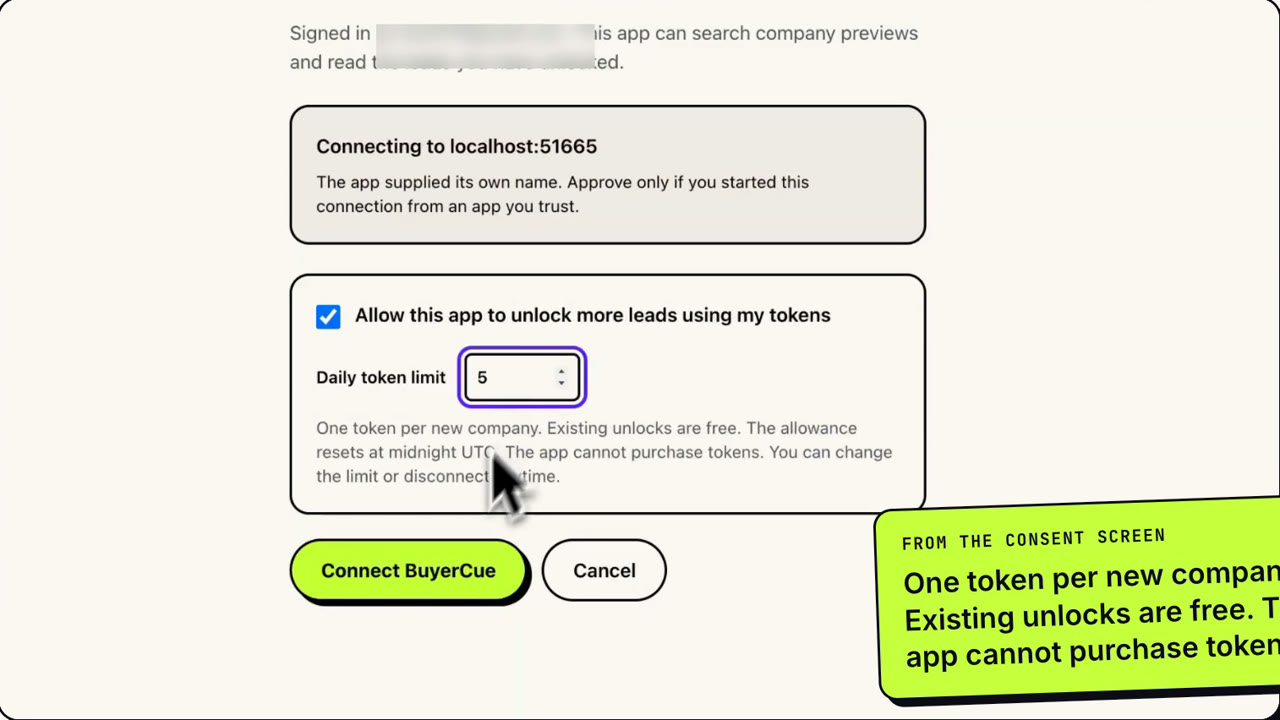
Approve access on BuyerCue. Choose whether the app may unlock leads and how many tokens it can spend per day. No API keys to paste.
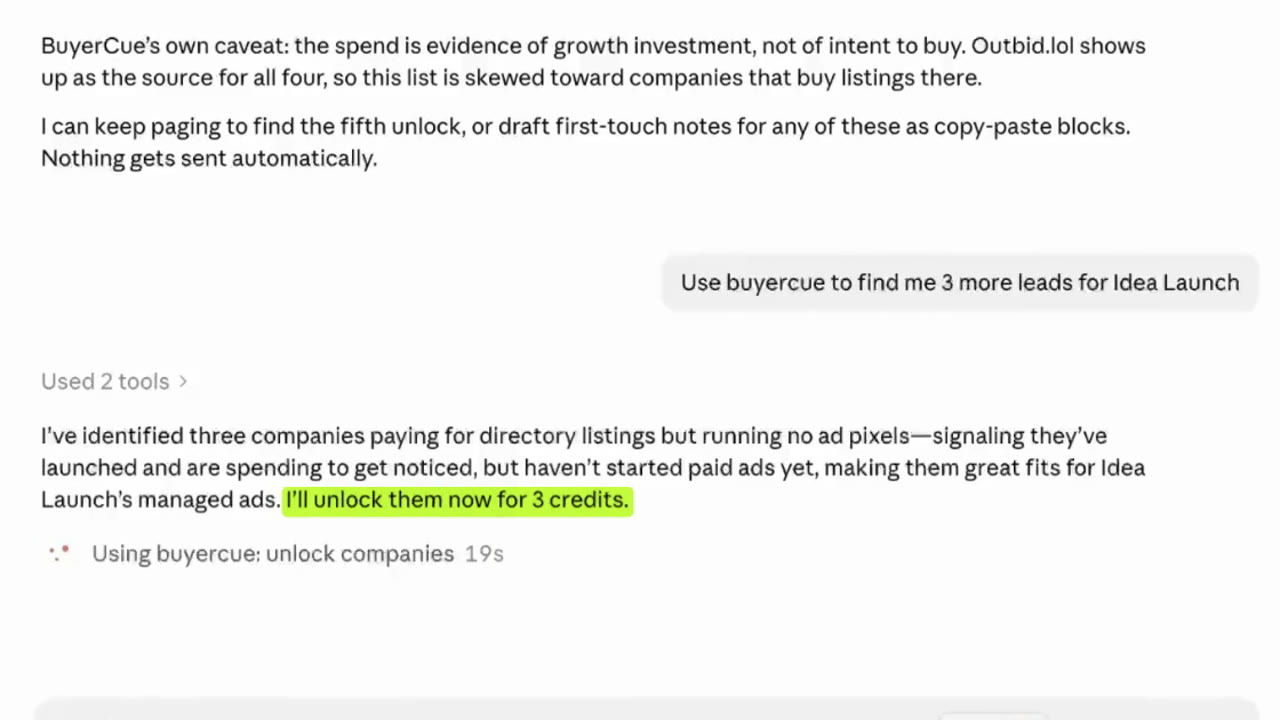
Ask about leads you own, find and unlock new ones that fit your offer, then have it draft a first message for each.
No setup? Use with AI
On any company you've unlocked, or a whole list in My Leads, choose Use with AI. Pick a task, say what you sell, and copy a ready-to-paste prompt into Claude, ChatGPT or any assistant. No tokens are spent. Read the guide.
One per company, shaped for its best route: a short form message, an email with a subject line, or a DM.
Tell it what you sell and get fit verdicts with reasons, strongest first.
What they sell, what their evidence shows about recent spend, discovery questions and likely objections.
Groups of companies that would respond to the same pitch, with an opener for each.
Illustrative example, not a real company.
# Draft first-touch messages: 1 company

## What I sell
<offer>Churn analytics for Stripe-billed SaaS</offer>

## Rules
- Use only the facts in the <companies> block…
- Business channels only. Drafts only: I send.

<company n="1">
name: PulseDesk
does: Shared-inbox helpdesk for small support teams
buying signal: 81/100 · high
listings:
  - saaslaunchpad · confirmed paid · first seen 2026-08-21
stack: paid tools: Intercom, Segment, HubSpot
reach: easy · best route: contact form
</company>
Why it works
A confirmed paid placement is a past transaction with a source you can check. That makes it firmer than an intent guess from a page visit, but it isn't proof of a current need for your product.
When a company appears on several paid boards, we list each placement with its source and dates so you can see the pattern yourself. Past placements don't predict future spend.
Every claim links back to the page it came from, with the date. You can verify a row before you send anything.
We only qualify companies with at least one published business contact route, so the list is actionable, not aspirational.
We show you where every fact came from and when. If we don't know something, we leave it blank.
Free shows you how many businesses match and why they qualify. Paid reveals who they are and how to reach them.